
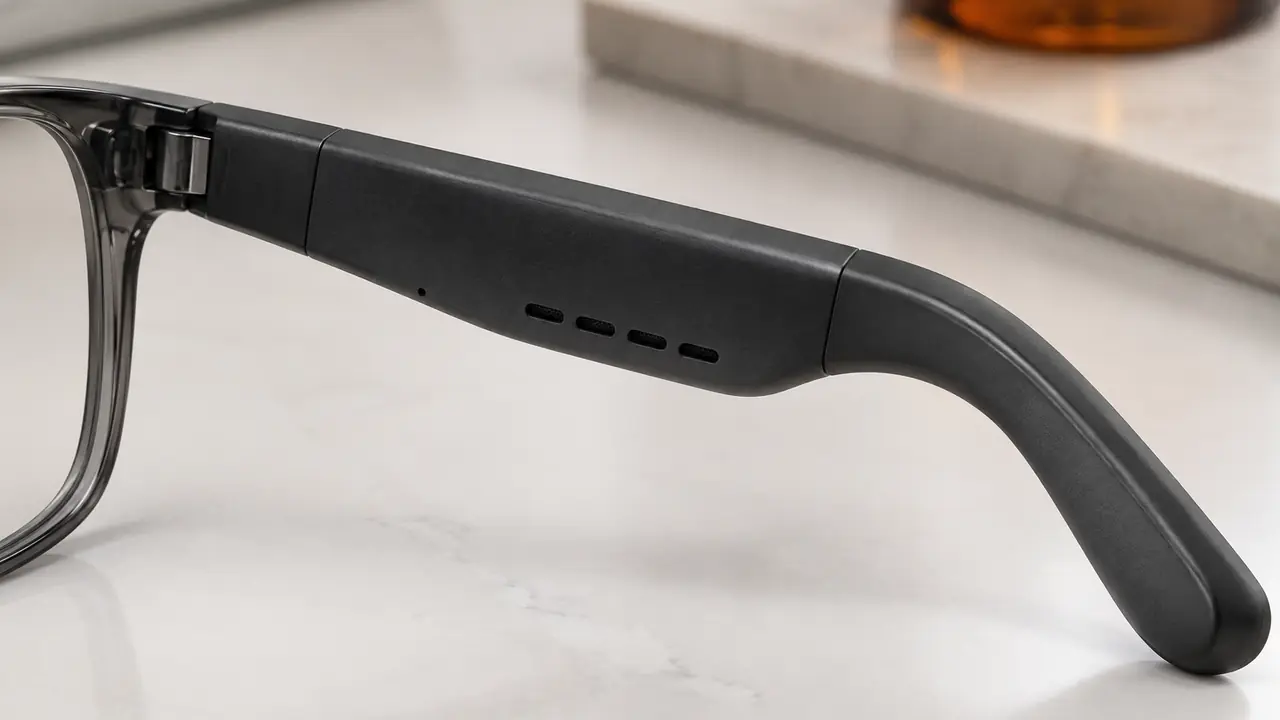
Why controls are a design decision
Earbuds have a small, well-understood control vocabulary. Glasses have more room on the temple but more ways to go wrong: the wearer touches the temple to adjust the frame, pushes it up the nose, takes it off with one hand and folds it on a desk. Every one of those movements can be read as a command if the controls are poorly designed. At the same time, controls need to work with wet fingers after a run, with gloves in winter and without looking. The right answer depends on the use case, and it should be decided early, because the control hardware is set by the temple tooling while the gestures and their meanings are set per firmware.
Control types compared
| Control | How it works | Strength | Typical weakness |
|---|---|---|---|
| Capacitive touch strip | Detects finger taps and swipes along the temple | Clean look, rich gestures | False triggers from sweat, hair or frame adjustment |
| Physical button | Mechanical switch under the temple surface | Works with gloves and wet fingers | Visible, adds a sealing point, fewer gestures |
| Button plus touch | Button for power and pairing, touch for media | Reliable power control, flexible media control | More parts and a slightly busier temple |
| Phone voice assistant | Glasses trigger the phone's assistant over Bluetooth | Hands-free, no extra processing on the glasses | Depends on phone settings and network |
| Wake word per firmware | On-device detection of a spoken trigger phrase | Fully hands-free | Battery draw, false wakes, privacy questions |
| Head gesture | Motion sensor reads nods or shakes, per firmware | Useful when hands are busy | Needs a motion sensor, accidental triggers |
Most audio glasses combine a touch strip with either a small button or a long-press power gesture, and use the phone's voice assistant for voice commands. AI glasses add an assistant of their own, which is covered in AI assistants on smart glasses.
Designing touch gestures
A good touch map is short and consistent. Single tap for play and pause or answering a call, double tap for skipping or ending a call, swipe forward and back for volume, and a long press for the voice assistant or power is a common pattern. The fewer distinct gestures, the fewer mistakes. Both temples can share the map or split it, for example volume on one side and track control on the other, but the split should be printed on the quick-start card.
Sensitivity tuning is where most of the work happens. The touch controller must ignore slow contact such as adjusting the frame, ignore water drops and sweat, and still respond to a deliberate tap. Plants tune thresholds, debounce time and the touch area per firmware. A recessed or textured touch zone also helps the finger find it without looking, which reduces accidental touches elsewhere on the temple.
Wear detection
Some models add a wear sensor - typically a proximity or capacitive sensor on the inside of the temple - so music pauses when the glasses come off and resumes when they go back on, and the pair can sleep to save battery. It is convenient but adds another source of surprises: dark hair, a hat or a loose fit can confuse it. It should be switchable in the app, and its behaviour should be checked on several head sizes. A short delay before pausing, typically set per firmware, avoids music stopping every time the wearer lifts the frame to rub their eyes or wipe sweat.
Voice control and privacy
Voice control on audio glasses usually means a long press that opens the phone's assistant, with the glasses acting as microphone and speaker. This keeps the glasses simple and leaves speech processing to the phone and its settings. A wake word running on the glasses themselves is fully hands-free but requires the microphones and a small detector to stay active, which costs battery and occasionally triggers on similar-sounding speech.
Any always-listening feature raises fair questions from customers and from enterprise buyers. The listing and app should state plainly whether wake-word detection happens on the device, what is sent to the phone or the cloud after the wake word, and how to switch the feature off. These points belong in the app permissions and privacy text, as set out in smart glasses data and app permissions. Under the EU radio equipment rules, connected wearables also fall under the cybersecurity requirements in EN 18031 from August 2025, which the test lab assesses per project.
What to specify and test
A controls section on the spec sheet should list the control hardware on each temple, the full gesture map, sensitivity settings and their version per firmware, which settings the app can change, wear detection on or off by default, the voice assistant route and any wake word, and the prompt tones or voice prompts for each action. Prompts in the customer's language matter more than they appear; a pairing prompt in the wrong language is a common early review complaint.
- Agree the map. One table of gestures and actions for music, calls and assistant.
- Test real conditions. Wet fingers, light gloves, frame adjustment and putting on and taking off.
- Count false triggers. Wear the samples for a normal day and log unwanted actions.
- Check prompts. Language, volume and timing of tones and voice prompts.
- Freeze. Record the firmware version and sensitivity settings on the golden sample.
Controls in the sourcing program
On a catalog model, the control hardware is fixed and the gesture map is what the plant has implemented, with some room for change per firmware. On a logo program, gestures, prompt languages and default settings can often be adjusted before shipment once approved on the golden sample. Moving from touch to a physical button, or adding a wear sensor, needs new temple tooling and is a full custom program from about 3,000 pairs. Typical starting quantities are 50 to 500 pairs per catalog model and 500 to 1,000 pairs for a logo program, confirmed in writing per program on MOQ and lead time. Tell the desk about your customers' conditions - gloves, sport, office - on the quote form.